


Live Chat Video Call-Whatslive
4.62.28K Reviews
App Specs
- Version
- 2.4.63
- Updated On
- License
- Free
- Downloads
- 10,000,000+
- Developer
- Live Chat.Video Chat
- Categories
- Social
- Platform
- Android
Screenshots




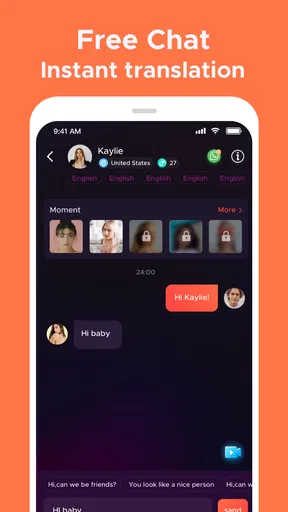
 Analysis by AppCompare
I approached Live Chat Video Call-Whatslive as a social app for people who want immediate video conversations rather than carefully arranged online chats. Its purpose is easy to understand: it connects you with strangers for live video chat and video calls. That makes the experience more spontaneous than a normal messaging app, but also more unpredictable.
My overall impression is that it suits curious, outgoing adults who are comfortable meeting people without much preparation. It is less suitable for anyone looking for a tightly controlled community, a professional networking tool, or a calm messaging environment. The important decision is not simply whether you enjoy video calls; it is whether you are happy with the uncertainty that comes with live conversations involving people you do not know.
What I considered before recommending it
When I judge a stranger-video app, I look beyond the promise of instant conversation. I want to know how much effort it takes to start, whether the format feels natural after the first few calls, how easy it is to leave an uncomfortable interaction, and whether the app fits the way a person actually spends time on their phone.
WhatsLive is free to install, which makes trying the basic experience straightforward. It is published by Live Chat.Video Chat and belongs to the social category. The app has reached over 10 million installs, with an average rating of 4.6 from around 167 thousand ratings and about 2.3 thousand written reviews. Those figures suggest that the concept has found a substantial audience, although popularity alone should not decide whether it is right for you.
The age label matters here. The app is rated Mature 17+, and I would treat that as a practical boundary rather than a minor store detail. Video conversations with strangers can change direction quickly, so I would not recommend handing the experience to a younger teenager or using it around children as though it were an ordinary family social app.
The current version is 2.4.63 and it supports devices running Android 6.0 or later. That broad compatibility is useful if you are using an older Android phone, but the quality of any live video experience still depends on the handset, camera, microphone, and connection you have available. I would test it somewhere with stable internet before deciding that a poor call is the app’s fault.
The first-session experience
What makes this app different from a standard social network is the lack of a long setup ritual. You are not primarily building a public profile, writing posts, or waiting for a mutual connection. The appeal is the possibility of moving from opening the app to a real-time conversation quickly.
Worth Reading Before You Choose

EA SPORTS FC Mobile 26 Is a Bigger Football Game, but It Takes Time

Flipboard Shows What News Apps Must Do Beyond the Feed

Switching to Android Auto Means Rethinking Your Driving Routine

Google Calendar Makes a Crowded Week Easier to Manage

Ludo King Makes the Most of the Minutes Between Plans

Baby Panda World Brings Quick Play to Modern Phones, but Its Game Library Feels Busy
That speed is its strongest emotional advantage. If I have a few spare minutes and want a human interaction instead of another stream of silent scrolling, a live video format feels more direct. It can also be useful for someone who enjoys practicing conversation with unfamiliar people, provided they understand that the app is entertainment and social discovery, not a guaranteed route to meaningful friendships.
The trade-off is that the first impression depends heavily on who happens to be available. A well-matched conversation can feel lively immediately, while an awkward or unwanted call can make the whole service seem less appealing. I would not judge it after one short session, but I also would not force myself to continue if the atmosphere feels uncomfortable.
Three habits that make the experience better
My first practical tip is to decide your exit rule before starting. If a person is rude, pressures you, or simply makes you uncomfortable, end the interaction instead of trying to rescue it. In a live stranger conversation, politeness should never outweigh your comfort. This small habit prevents the app’s spontaneity from turning into an obligation.
Second, use it in a setting where you can pay attention to your surroundings. A private room is better than a bus, workplace, or shared family space, not only because of privacy but also because background noise can make a short call frustrating. Headphones can help with sound, but they do not solve every issue caused by poor lighting or a weak camera.
Third, avoid treating a pleasant conversation as proof that the other person is trustworthy. Do not reveal your address, workplace details, routine, financial information, or personal documents during a casual call. If someone quickly asks to move to another service, sends a payment request, or pushes for intimate material, I would end the conversation immediately rather than negotiate.
Where WhatsLive wins
WhatsLive is at its best when the user wants immediacy. Traditional social networks reward posting and checking back later. Messaging apps usually work best when both people already know each other. Dating platforms often place a layer of profiles, matching, and written conversation between the user and a possible call. This app focuses more directly on the live encounter.
That makes it a reasonable choice for people who dislike composing long opening messages. If you communicate better through tone and facial expression, the video format can reveal more than a short text exchange. It is also a useful change of pace for someone who finds ordinary scrolling repetitive and wants an interaction that requires active participation.
Another strength is its low commitment. You do not need to plan an event or arrange a call with a friend several hours in advance. A short session can fit into a break, although I would avoid using it while distracted or in a place where a private conversation could be overheard.
The app’s large install base also means the idea is not obscure. There is a clear audience for this type of social discovery, and the strong average rating indicates that many users find the core experience enjoyable. I would read that as evidence that the format works for a lot of people, not as a promise that every call will be good.
A less obvious benefit is that the format quickly teaches you what kind of social interaction you actually want. After a few sessions, you may discover that you prefer brief, playful exchanges, longer conversations, or no stranger calls at all. That clarity can help you choose a different category of app instead of endlessly adjusting a profile on a service that does not match your personality.
Where another category may fit better
If your main goal is keeping up with friends and relatives, I would choose a conventional calling app instead. You already know the people there, you can arrange a suitable time, and the conversation is less dependent on chance. WhatsLive is built around meeting strangers, so it adds uncertainty that is unnecessary for familiar contacts.
If you want lasting friendships, a community organized around a shared interest may be a better fit. A hobby group, discussion service, or moderated forum gives you a subject to return to and a reason to recognize the same people over time. WhatsLive can create an enjoyable moment, but the live stranger format does not automatically provide continuity.
For dating, I would be cautious about using it as a replacement for a dedicated dating service. Video can help you see whether conversation feels natural, but a dating-focused platform generally gives users more context about intentions before a call begins. WhatsLive makes more sense if spontaneous social contact is the goal; it is not the obvious choice if you want a structured path toward a relationship.
It is also a poor match for anyone who strongly dislikes being seen on camera. The app’s central activity is live video, so there is no point installing it hoping to use it like a text-only network. Even users who are camera-shy may enjoy it occasionally, but they should expect the visual element to remain central rather than optional in spirit.
Privacy, boundaries, and the mature audience
The Mature 17+ rating should shape how you use the app. I would keep identifying details out of the background, avoid showing documents or screens, and check what is visible behind me before beginning a call. A casual video can reveal more than intended through a room, uniform, street view, or notification appearing on the phone.
I would also make a personal rule about contact details. There is no need to share a phone number, home location, school, or workplace just because a conversation feels friendly. If you decide to continue contact elsewhere, take time to consider whether the person has earned that access. A good conversation is not the same thing as a verified identity.
When a stranger behaves badly, the correct response is simple: leave the call and use the app’s available safety controls if needed. I would not spend time arguing, trying to teach manners, or collecting evidence for a private confrontation. The advantage of a live format is that you can end it quickly, and that control is more valuable than winning the final word.
Parents and guardians should not treat the age label as a complete safety system. A mature rating tells you who the app is intended for, but it does not remove the need for judgment. For an adult user, the same advice applies: keep the camera pointed at a neutral setting, use sensible boundaries, and remember that the person on screen may not be who they claim to be.
Free to start, but watch the spending path
The app is free, which lowers the barrier to experimentation. However, it includes in-app purchases ranging from $0.49 to $499.99 per item. That is a very wide range, and it is the main financial caution I would give before using it regularly.
I would not add payment details casually or buy anything during the excitement of a fast-moving conversation. Set a personal spending limit first, and make sure you understand what a purchase does before confirming it. If you are only curious about the social format, the sensible approach is to explore the free experience and decide whether it has lasting value before spending.
This is also where the cost of switching matters. Moving from WhatsLive to a normal messenger may mean losing the surprise of instant stranger conversations, but it can give you more control and fewer impulsive decisions. Moving to an interest-based community may require more patience because relationships develop through repeated participation rather than immediate calls. Moving to a dating app may involve more profile work, but that preparation can make intentions clearer.
In other words, the free download is not the whole decision. Ask yourself whether you want spontaneous access, structured matching, familiar contacts, or an ongoing community. The right alternative depends less on which app is most popular and more on which kind of social effort you are willing to make.
A realistic everyday scenario
Imagine finishing work with twenty quiet minutes before dinner. You do not want to write messages or scroll through posts, but you feel like talking. WhatsLive can fill that gap with a live conversation that begins without arranging a call in advance. If the exchange is enjoyable, you get a small burst of social energy; if it is dull, you can leave and move on.
Now change the situation: you are in a crowded café, your battery is low, and you need to concentrate on an important task. I would skip the app. The camera, microphone, and unpredictable conversation are likely to create more friction than enjoyment. A saved podcast, a text conversation with a friend, or a later scheduled call would fit that moment better.
That contrast captures the app well. It is not a universal replacement for social communication. It is a specific tool for people who sometimes want an unplanned, face-to-face exchange with someone outside their usual circle.
My recommendation after weighing the trade-offs
I recommend WhatsLive to adults who are comfortable with live video, understand the risks of stranger interaction, and want a quick alternative to passive social feeds. The app’s strongest quality is its directness: it turns social discovery into an active conversation instead of a long sequence of profiles and messages.
I would skip it if you need predictable contacts, detailed identity context, strong topic-based organization, or a private way to speak with people you already know. I would also avoid spending heavily until the free experience has proved that it belongs in your routine. The broad range of optional purchase prices makes restraint especially important.
My final advice is to try it with modest expectations. Use a private setting, keep personal information private, leave uncomfortable calls immediately, and judge the app by several ordinary sessions rather than one unusually good or bad encounter. For the right user, the real value is the immediacy of a human conversation without a long setup. For everyone else, a familiar messenger, moderated community, or more structured matching service will probably be the better choice.
As a free social app from Live Chat.Video Chat, it earns a place on the shortlist for spontaneous video interaction, especially for mature users who know how to manage boundaries. I see it as a focused option rather than an all-purpose social home: enjoyable when you want surprise and conversation, less convincing when you want control, continuity, or certainty.
Pros
- Quickly connects you with people for spontaneous video conversations.
- Simple interface makes starting a live chat easy for new users.
- Video and audio interactions feel more personal than text messaging.
- Useful for meeting people from different places and backgrounds.
- Live communication can be more engaging than browsing social feeds.
Cons
- Chat quality depends heavily on your internet connection and device camera.
- Some users may encounter inappropriate behavior during random conversations.
- Privacy settings should be checked carefully before sharing personal details.
- Frequent video calls can consume significant mobile data and battery.
- The experience may vary depending on how many active users are online.
FAQs for Live Chat Video Call-Whatslive
What is Live Chat Video Call-Whatslive and how does it work?
Live Chat Video Call-Whatslive is a social communication app designed for meeting and chatting with other users through live video calls and messaging. After creating or accessing an account, you can browse available profiles, start conversations, and use video features when supported by the other participant. The exact options may depend on your location, account status, app version, and the permissions you grant.
Is Live Chat Video Call-Whatslive free to download and use?
The application may be available to download at no initial cost, but some features can require in-app purchases, subscriptions, credits, or other payments. Video calls, virtual gifts, premium profiles, or enhanced discovery tools may not all be included in the free experience. Before confirming a purchase, review the price, renewal terms, and payment details shown in the Google Play Store or Apple App Store.
Is Live Chat Video Call-Whatslive safe for meeting strangers online?
As with any live-chat platform, users should be careful when communicating with people they do not know. Avoid sharing your home address, financial information, passwords, private documents, or personal contact details too quickly. Use the app’s block and report tools whenever someone behaves suspiciously or makes you uncomfortable. Remember that profiles and identities may not always be genuine.
What permissions does Live Chat Video Call-Whatslive require?
A video-chat application commonly requests access to the camera and microphone so you can participate in live calls. It may also request notifications, storage, or other permissions depending on the device and features you use. Grant only permissions that are necessary for your intended activity, and check them in your Android or iOS privacy settings. If a permission seems unrelated, consider denying it.
Can I control who contacts me or stop using Live Chat Video Call-Whatslive?
You can usually manage unwanted interactions by blocking users, reporting inappropriate behavior, adjusting notification settings, or limiting profile visibility where those controls are available. If you decide to leave, deleting the app does not necessarily cancel a paid subscription. Check your Google Play or Apple account subscriptions separately, and look inside the app for account-deletion or data-removal instructions before uninstalling it.


